
HTML 인앱 메시지 템플릿
HTML 인앱 메시지 템플릿을 사용해서 빠르게 시작해보세요.복사 붙여넣기만으로 바로 이용할 수 있는 HTML 인앱 메시지 템플릿을 제공합니다.
How to use
- 핵클 대시보드에서 인앱 메시지 캠페인을 생성합니다.
- 레이아웃 > HTML을 선택합니다.
- 아래에서 제공하는 템플릿 중 하나를 선택합니다.
- 템플릿과 함께 제공되는 HTML 코드를 복사하여 핵클 HTML 에디터에 붙여넣습니다.
- 템플릿 내용을 자사 서비스에 맞는 내용으로 업데이트합니다.
- 실제 디바이스에서 메시지를 테스트한 뒤 캠페인을 운영합니다.
템플릿 목록
Confetti
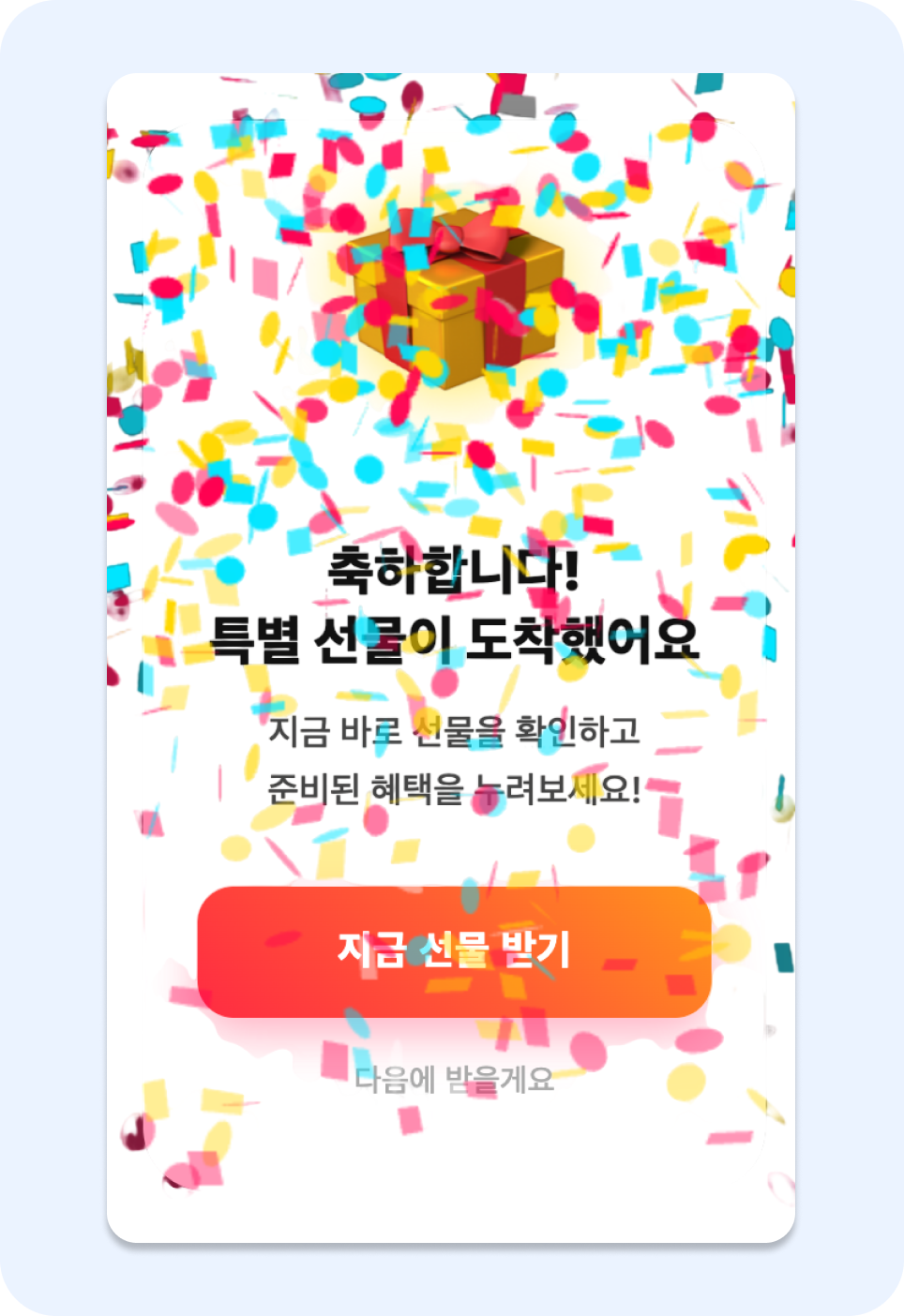
Confetti 인앱 메시지
구성 요소
- 외부 script를 활용하여 confetti를 렌더링합니다.
- "지금 선물 받기" 버튼을 클릭하는 경우
https://example.com/giftURL로 이동하며 **mega_gift_receive** 를 이벤트 속성으로 포함하는 인앱 메시지 전환 이벤트를 발생시킵니다. - "다음에 받을게요" 버튼을 클릭하는 경우 인앱 메시지가 닫힙니다.
HTML Code
<!DOCTYPE html>
<html lang="ko">
<head>
    <meta charset="UTF-8">
    <meta name="viewport" content="width=device-width, initial-scale=1.0">
    <script src="https://cdn.jsdelivr.net/npm/[email protected]/dist/confetti.browser.min.js"></script>
    <style>
        * { box-sizing: border-box; margin: 0; padding: 0; -webkit-tap-highlight-color: transparent; }

        body {
            font-family: -apple-system, BlinkMacSystemFont, "Segoe UI", Roboto, sans-serif;
            background-color: rgba(0, 0, 0, 0.75);
            display: flex;
            justify-content: center;
            align-items: center;
            height: 100vh;
            width: 100vw;
            overflow: hidden;
        }

        .container {
            width: 85%;
            max-width: 320px;
            background: #ffffff;
            border-radius: 28px;
            padding: 40px 24px;
            position: relative;
            text-align: center;
            box-shadow: 0 25px 50px rgba(0,0,0,0.6);
            animation: zoomIn 0.6s cubic-bezier(0.34, 1.56, 0.64, 1);
            z-index: 10;
        }

        @keyframes zoomIn {
            0% { opacity: 0; transform: scale(0.3) rotate(-5deg); }
            100% { opacity: 1; transform: scale(1) rotate(0deg); }
        }

        .gift-wrapper {
            position: relative;
            display: inline-block;
            margin-bottom: 25px;
        }

        .gift-box {
            font-size: 90px;
            display: block;
            filter: drop-shadow(0 0 15px rgba(255, 215, 0, 0.6));
            animation: superBounce 1.5s infinite ease-in-out;
        }

        .gift-wrapper::before {
            content: '';
            position: absolute;
            top: 50%; left: 50%;
            width: 120px; height: 120px;
            background: radial-gradient(circle, rgba(255,223,0,0.4) 0%, rgba(255,223,0,0) 70%);
            transform: translate(-50%, -50%);
            animation: pulse 2s infinite;
            z-index: -1;
        }

        @keyframes superBounce {
            0%, 100% { transform: scale(1) translateY(0); }
            30% { transform: scale(1.1, 0.9) translateY(-20px); }
            50% { transform: scale(0.9, 1.1) translateY(0); }
            70% { transform: scale(1.05, 0.95) translateY(-10px); }
        }

        @keyframes pulse {
            0% { transform: translate(-50%, -50%) scale(0.8); opacity: 0.5; }
            50% { transform: translate(-50%, -50%) scale(1.2); opacity: 0.8; }
            100% { transform: translate(-50%, -50%) scale(0.8); opacity: 0.5; }
        }

        .title { font-size: 24px; font-weight: 900; color: #111; margin-bottom: 12px; line-height: 1.3; }
        .desc { font-size: 16px; color: #444; margin-bottom: 30px; line-height: 1.6; font-weight: 500; }

        .cta-btn {
            width: 100%;
            padding: 18px;
            border: none;
            border-radius: 16px;
            background: linear-gradient(45deg, #FF0050, #FF5C33, #FFD700);
            background-size: 200% 200%;
            color: white;
            font-size: 18px;
            font-weight: 800;
            cursor: pointer;
            box-shadow: 0 8px 20px rgba(255, 65, 108, 0.4);
            animation: gradientMove 3s ease infinite;
            transition: transform 0.2s;
        }

        @keyframes gradientMove {
            0% { background-position: 0% 50%; }
            50% { background-position: 100% 50%; }
            100% { background-position: 0% 50%; }
        }

        .cta-btn:active { transform: scale(0.95); }

        .close-btn {
            margin-top: 20px;
            background: none;
            border: none;
            color: #aaa;
            text-decoration: none;
            font-size: 14px;
            font-weight: 500;
            cursor: pointer;
        }
    </style>
</head>
<body>

<div class="container">
    <div class="gift-wrapper">
        <span class="gift-box">🎁</span>
    </div>
    <h2 class="title">축하합니다!<br>특별 선물이 도착했어요</h2>
    <p class="desc">지금 바로 선물을 확인하고<br>준비된 혜택을 누려보세요!</p>

    <button class="cta-btn" id="gift-receive">지금 선물 받기</button>
    <button class="close-btn" id="close-btn">다음에 받을게요</button>
</div>

<script>
    function startMegaConfetti() {
        const duration = 5 * 1000;
        const animationEnd = Date.now() + duration;

        const frame = () => {
            confetti({
                particleCount: 3,
                angle: 60,
                spread: 55,
                origin: { x: 0 },
                colors: ['#FF0050', '#FFD700', '#00E5FF', '#7C4DFF'],
                scalar: 1.5
            });
            confetti({
                particleCount: 3,
                angle: 120,
                spread: 55,
                origin: { x: 1 },
                colors: ['#FF0050', '#FFD700', '#00E5FF', '#7C4DFF'],
                scalar: 1.5
            });

            if (Date.now() < animationEnd) {
                requestAnimationFrame(frame);
            }
        };

        confetti({
            particleCount: 150,
            spread: 100,
            origin: { y: 0.6 },
            colors: ['#FF0050', '#FFD700', '#FFFFFF'],
            scalar: 2
        });

        frame();
    }
    startMegaConfetti();

    // 핵클 브릿지 연동
    window.addEventListener("hackleBridgeReady", function () {
        document.getElementById('gift-receive').addEventListener('click', function() {
            // 선물 받기 클릭 트래킹 및 이동
            Hackle.bridge.handleUrl("https://example.com/gift", "mega_gift_receive");
        });

        document.getElementById('close-btn').addEventListener('click', function() {
            Hackle.bridge.closeInAppMessage();
        });
    });
</script>

</body>
</html>
Scratch
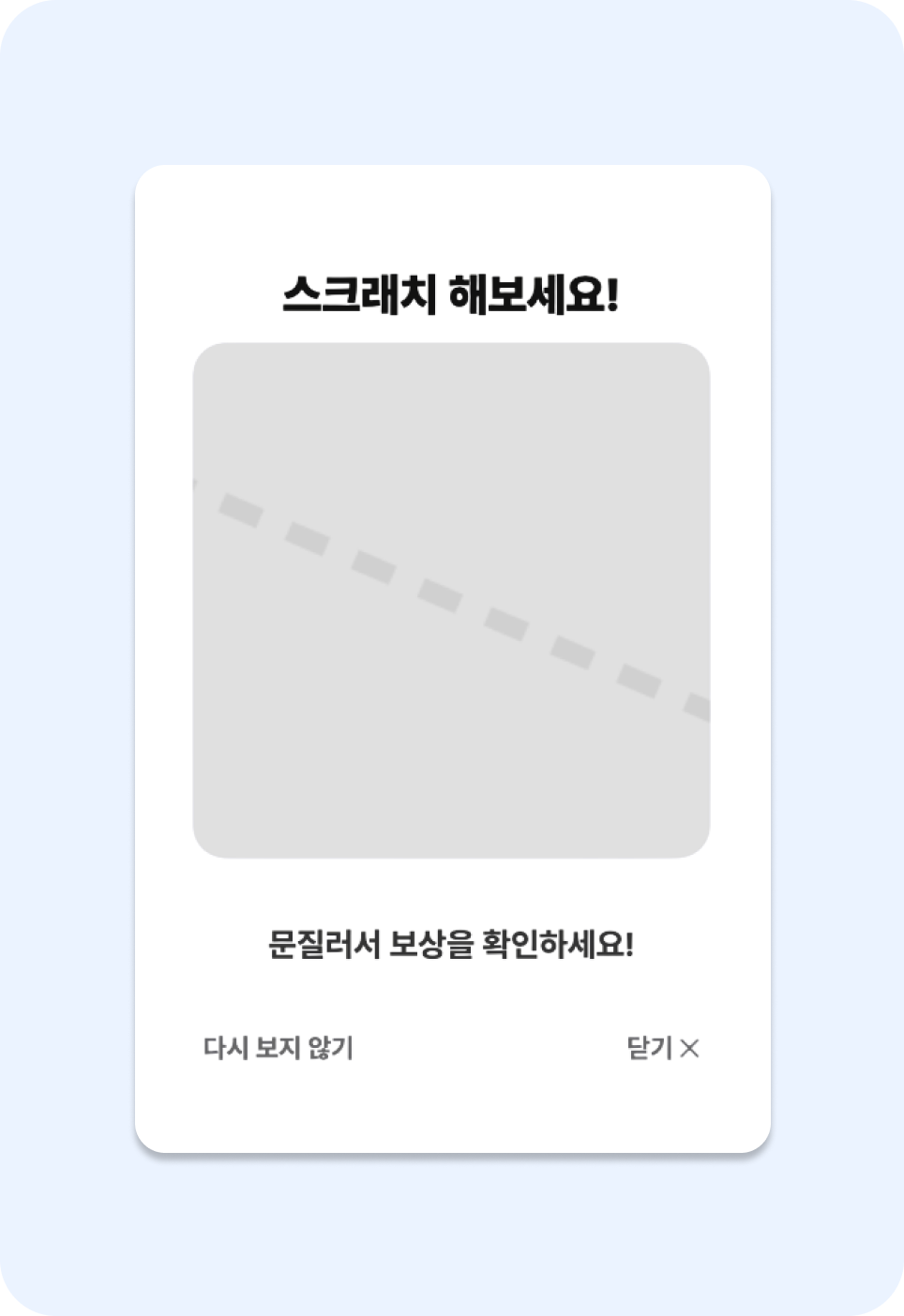
Scratch 인앱 메시지
구성 요소
- canvas를 활용하여 scratch할 수 있는 보드를 렌더링합니다.
- "다시 보지 않기"와 "닫기 버튼"을 클릭하는 경우 인앱 메시지를 닫습니다.
- scatch 하면 "이용권 받기" CTA가 노출되고, 클릭 시에
https://naver.comURL로 이동하며 **scratch_event** 를 이벤트 속성으로 포함하는 인앱 메시지 전환 이벤트를 발생시킵니다.
HTML Code
<!DOCTYPE html>
<html lang="ko">
<head>
    <meta charset="UTF-8">
    <meta name="viewport" content="width=device-width, initial-scale=1.0, maximum-scale=1.0, user-scalable=no">
    <style>
        /* 기본 스타일 초기화 */
        body, html { margin: 0; padding: 0; width: 100%; height: 100%; font-family: 'Pretendard', sans-serif; background: rgba(0,0,0,0.5); display: flex; justify-content: center; align-items: center; }

        /* 메시지 컨테이너 (첨부 이미지 배경색 반영) */
        .modal-container { width: 90%; max-width: 340px; background-color: #F9F9E0; border-radius: 24px; padding: 20px; box-sizing: border-box; position: relative; text-align: center; box-shadow: 0 10px 25px rgba(0,0,0,0.2); }

        /* 타이틀 & 텍스트 */
        .title { font-size: 22px; font-weight: 800; color: #111; margin: 15px 0 10px; }
        .reward-text { font-size: 16px; font-weight: 600; color: #333; margin-bottom: 20px; line-height: 1.4; min-height: 44px; display: flex; align-items: center; justify-content: center; }

        /* 스크래치 영역 */
        .scratch-wrapper { position: relative; width: 100%; aspect-ratio: 1 / 1; background: #fff; border-radius: 16px; overflow: hidden; margin-bottom: 20px; }

        /* 아래 숨겨진 결과물 */
        .scratch-result { position: absolute; top: 0; left: 0; width: 100%; height: 100%; display: flex; flex-direction: column; justify-content: center; align-items: center; background-color: #fff; z-index: 1; }
        .scratch-result img { width: 60%; margin-bottom: 10px; }
        .scratch-result p { font-size: 18px; font-weight: bold; color: #FF4D00; margin: 0; }

        /* 덮개용 Canvas */
        #scratch-canvas { position: absolute; top: 0; left: 0; width: 100%; height: 100%; cursor: crosshair; z-index: 2; touch-action: none; }

        /* CTA 버튼 (초기 숨김) */
        #cta-button { display: none; width: 100%; padding: 16px; background-color: #82D7EF; color: white; border: none; border-radius: 12px; font-size: 18px; font-weight: bold; cursor: pointer; transition: background 0.2s; }
        #cta-button.visible { display: block; animation: fadeInUp 0.5s ease-out; }

        /* 하단 닫기 영역 */
        .footer-links { display: flex; justify-content: space-between; margin-top: 15px; padding: 0 5px; }
        .footer-links span { font-size: 13px; color: #666; cursor: pointer; }

        @keyframes fadeInUp {
            from { opacity: 0; transform: translateY(10px); }
            to { opacity: 1; transform: translateY(0); }
        }
    </style>
</head>
<body>

<div class="modal-container">
    <div class="title">스크래치 해보세요!</div>

    <div class="scratch-wrapper">
        <div class="scratch-result">
            <p>🎉 당첨!</p>
            <p style="font-size: 16px; color: #333; margin-top: 5px;">핵클 7일 무료 이용권</p>
        </div>
        <canvas id="scratch-canvas"></canvas>
    </div>

    <div class="reward-text" id="status-msg">문질러서 보상을 확인하세요!</div>

    <button id="cta-button">받으러 가기</button>

    <div class="footer-links">
        <span onclick="closeInApp()">닫기 ✕</span>
    </div>
</div>

<script>
    const canvas = document.getElementById('scratch-canvas');
    const ctx = canvas.getContext('2d', { willReadFrequently: true });
    const ctaBtn = document.getElementById('cta-button');
    const statusMsg = document.getElementById('status-msg');
    let isDrawing = false;
    let isFinished = false;

    // 1. 캔버스 초기화 (회색 더미 이미지 느낌)
    function initCanvas() {
        const rect = canvas.parentNode.getBoundingClientRect();
        canvas.width = rect.width;
        canvas.height = rect.height;

        ctx.fillStyle = '#E0E0E0';
        ctx.fillRect(0, 0, canvas.width, canvas.height);

        ctx.strokeStyle = '#D0D0D0';
        ctx.lineWidth = 10;
        ctx.setLineDash([20, 15]);
        ctx.beginPath();
        ctx.moveTo(-50, 50); ctx.lineTo(canvas.width + 50, canvas.height - 50);
        ctx.stroke();
    }

    function scratch(e) {
        if (!isDrawing || isFinished) return;

        const rect = canvas.getBoundingClientRect();
        const x = (e.clientX || e.touches[0].clientX) - rect.left;
        const y = (e.clientY || e.touches[0].clientY) - rect.top;

        ctx.globalCompositeOperation = 'destination-out';
        ctx.lineWidth = 40;
        ctx.lineJoin = 'round';
        ctx.lineCap = 'round';

        ctx.beginPath();
        ctx.arc(x, y, 25, 0, Math.PI * 2);
        ctx.fill();

        checkProgress();
    }

    function checkProgress() {
        const imageData = ctx.getImageData(0, 0, canvas.width, canvas.height);
        const pixels = imageData.data;
        let transparent = 0;

        for (let i = 0; i < pixels.length; i += 4) {
            if (pixels[i + 3] < 128) transparent++;
        }

        const percent = (transparent / (pixels.length / 4)) * 100;
        if (percent > 40 && !isFinished) {
            isFinished = true;
            canvas.style.transition = 'opacity 0.5s';
            canvas.style.opacity = '0';
            setTimeout(() => { canvas.style.display = 'none'; }, 500);

            // UI 변경
            statusMsg.innerHTML = "<b>핵클 7일 무료 이용권 당첨!</b>";
            ctaBtn.classList.add('visible');
        }
    }

    canvas.addEventListener('mousedown', () => isDrawing = true);
    canvas.addEventListener('touchstart', () => isDrawing = true);
    window.addEventListener('mouseup', () => isDrawing = false);
    window.addEventListener('touchend', () => isDrawing = false);
    canvas.addEventListener('mousemove', scratch);
    canvas.addEventListener('touchmove', scratch);

    window.onload = initCanvas;

    // --- Hackle Bridge 연동 ---

    function closeInApp() {
        if (window.Hackle && window.Hackle.bridge) {
            Hackle.bridge.closeInAppMessage();
        }
    }

    window.addEventListener("hackleBridgeReady", function () {
        // CTA 클릭 시 handleUrl 호출
        ctaBtn.addEventListener("click", function () {
            Hackle.bridge.handleUrl("https://naver.com", "scratch_event");
        });
    });
</script>
</body>
</html>
Feedback
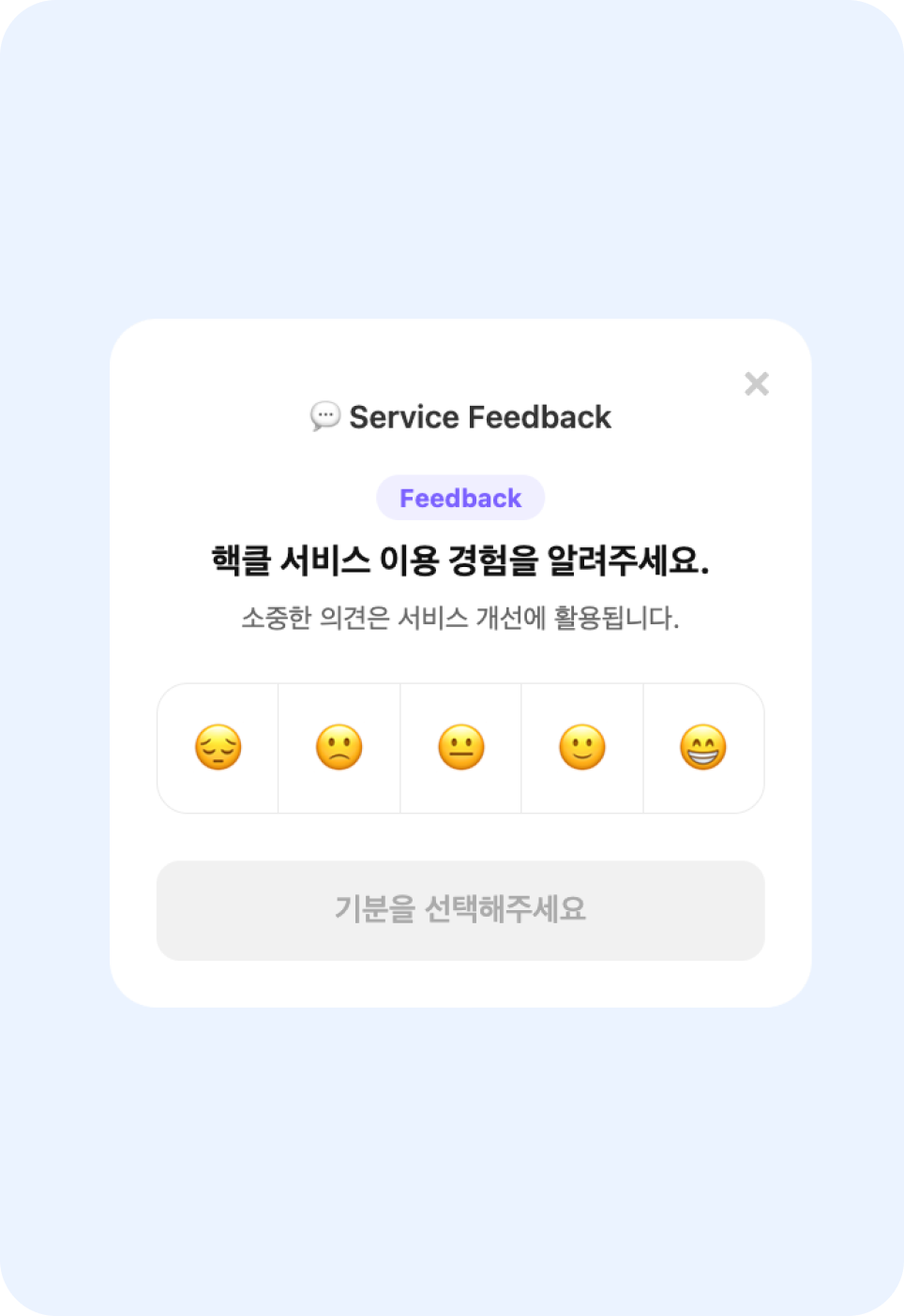
Feedback 인앱 메시지
구성 요소
- 이모지를 클릭하면 제출 버튼이 활성화됩니다.
- 제출 시 선택한 이모지를 이벤트 속성으로 포함하여 커스텀 이벤트를 전송합니다.
- 이벤트명:
daily_mood_survey_submit - 이벤트 속성(선택한 이모지):
mood_value
- 이벤트명:
- 제출 시
survey_submit_confirm를 이벤트 속성으로 갖는 인앱 메시지 전환 이벤트가 발생합니다.
HTML Code
<!DOCTYPE html>
<html lang="ko">
<head>
<meta charset="UTF-8">
<meta name="viewport" content="width=device-width, initial-scale=1.0">
<style>
/* 배경 설정: 전체 화면을 사용하되 투명하게 유지 */
body, html {
margin: 0;
padding: 0;
background: transparent;
font-family: -apple-system, BlinkMacSystemFont, "Segoe UI", Roboto, sans-serif;
height: 100%;
display: flex;
justify-content: flex-end; /* 오른쪽 정렬 */
align-items: flex-end; /* 하단 정렬 */
overflow: hidden;
}
/* 카드 컨테이너: 바텀시트 스타일 */
.survey-card {
width: 360px; /* 고정 너비 권장 */
background: #fff;
border-radius: 24px;
padding: 40px 24px 24px 24px;
margin: 20px; /* 화면 가장자리와의 여백 */
box-sizing: border-box;
position: relative;
box-shadow: 0 8px 32px rgba(0,0,0,0.12);
/* 등장 애니메이션: 하단에서 위로 슬라이드 */
animation: slideUp 0.5s cubic-bezier(0.25, 1, 0.5, 1);
}
@keyframes slideUp {
from { transform: translateY(100%); opacity: 0; }
to { transform: translateY(0); opacity: 1; }
}
/* 닫기 버튼: 우측 상단 배치 */
.close-btn {
position: absolute;
top: 16px;
right: 16px;
font-size: 28px;
line-height: 1;
color: #ccc;
cursor: pointer;
border: none;
background: none;
z-index: 10;
padding: 4px;
transition: color 0.2s;
}
.close-btn:hover { color: #888; }
/* 헤더 섹션 */
.header {
display: flex;
justify-content: center;
align-items: center;
margin-bottom: 20px;
color: #333;
}
.header-title {
display: flex;
align-items: center;
font-weight: 600;
font-size: 16px;
gap: 6px;
}
/* 배지 및 질문 */
.badge-wrapper { text-align: center; margin-bottom: 12px; }
.badge {
background: #F0EFFF;
color: #7B61FF;
padding: 4px 12px;
border-radius: 20px;
font-weight: bold;
font-size: 13px;
}
.main-question {
text-align: center;
font-size: 18px;
font-weight: 700;
margin-bottom: 8px;
color: #111;
line-height: 1.4;
}
.sub-text {
text-align: center;
font-size: 14px;
color: #666;
margin-bottom: 24px;
}
/* 이모지 평점 그룹 */
.emoji-group {
display: flex;
border: 1px solid #EAEAEA;
border-radius: 16px;
overflow: hidden;
margin-bottom: 24px;
}
.emoji-item {
flex: 1;
padding: 16px 0;
font-size: 26px;
text-align: center;
cursor: pointer;
transition: all 0.2s ease;
border-right: 1px solid #EAEAEA;
}
.emoji-item:last-child { border-right: none; }
.emoji-item:hover { background: #fcfcfc; }
/* 선택된 이모지 스타일 */
.emoji-item.selected {
background: #F0EFFF;
box-shadow: inset 0 0 0 2px #7B61FF;
z-index: 2;
}
/* 하단 버튼 */
.next-btn {
width: 100%;
padding: 16px;
background: #f1f1f1;
border-radius: 12px;
font-size: 16px;
font-weight: 600;
color: #aaa;
cursor: pointer;
transition: all 0.2s;
border: none;
}
/* 활성화된 버튼 스타일 */
.next-btn.active {
background: #7B61FF;
color: #fff;
box-shadow: 0 4px 12px rgba(123, 97, 255, 0.3);
}
/* 모바일 대응: 화면이 작을 경우 바닥에 꽉 차도록 설정 */
@media (max-width: 480px) {
body, html { justify-content: center; }
.survey-card {
width: 100%;
margin: 0;
border-radius: 24px 24px 0 0; /* 모바일은 상단만 라운드 처리 */
}
}
</style>
</head>
<body>
<div class="survey-card">
<!-- 닫기 버튼 -->
<button class="close-btn" id="close-btn">×</button>
<div class="header">
<div class="header-title">💬 Service Feedback</div>
</div>
<div class="badge-wrapper"><span class="badge">Feedback</span></div>
<div class="main-question">핵클 서비스 이용 경험을 알려주세요.</div>
<div class="sub-text">소중한 의견은 서비스 개선에 활용됩니다.</div>
<!-- 이모지 선택 영역 -->
<div class="emoji-group">
<div class="emoji-item" data-value="very_sad">😔</div>
<div class="emoji-item" data-value="sad">🙁</div>
<div class="emoji-item" data-value="neutral">😐</div>
<div class="emoji-item" data-value="happy">🙂</div>
<div class="emoji-item" data-value="very_happy">😁</div>
</div>
<!-- 제출 버튼 -->
<button class="next-btn" id="submit-btn" disabled>기분을 선택해주세요</button>
</div>
<script>
window.addEventListener("hackleBridgeReady", () => {
const closeButton = document.querySelector("#close-btn");
const submitButton = document.querySelector("#submit-btn");
const emojis = document.querySelectorAll('.emoji-item');
let selectedMood = null;
// 닫기 버튼 로직
closeButton.addEventListener("click", () => {
Hackle.bridge.closeInAppMessage();
});
// 이모지 선택 로직
emojis.forEach(el => {
el.addEventListener('click', () => {
emojis.forEach(e => e.classList.remove('selected'));
el.classList.add('selected');
selectedMood = el.getAttribute('data-value');
// UI 업데이트
submitButton.disabled = false;
submitButton.classList.add('active');
submitButton.textContent = "제출하기";
// 선택 로그 전송
Hackle.bridge.trackClick("mood_click_" + selectedMood);
});
});
// 제출 버튼 로직
submitButton.addEventListener("click", () => {
if (!selectedMood) return;
// 커스텀 이벤트 전송
Hackle.bridge.track("daily_mood_survey_submit", {
mood_value: selectedMood
});
// 제출 로그 전송
Hackle.bridge.trackClick("survey_submit_confirm");
// 즉시 닫기
Hackle.bridge.closeInAppMessage();
});
});
</script>
</body>
</html>Updated 17 days ago